
Mr. VoIP App for 3CX and Microsoft Teams
For iOS, Android, Windows & Mac
Mr VoIP's app creates a unified communication experience by connecting 3CX phone systems with Microsoft Teams. Users can manage calls, contacts, and internal and external chats from a single platform across multiple devices, keeping voice and messaging workflows in one place.
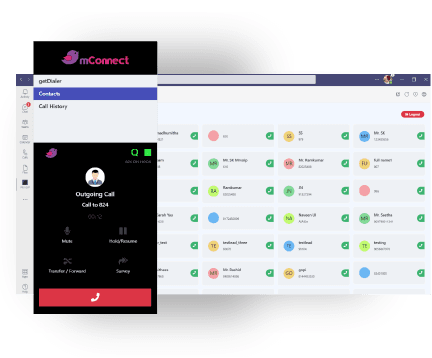
Contact and Call Management
Complete call and contact management integration between 3CX and Teams:
- Click2Call
- Make and receive calls
- Transfer calls
- Access call history
- Log-in and out of call queues
- View and manage contacts
- Forward customers to the agent survey tool
- Call logging and notes
Internal and External Chat Management
The app also offers integration for your company chat platforms:
- Internal chats between colleagues
- Website live chat with your website visitors
- WhatsApp integration
- Facebook integration
Getting Started
To start with the 3CX and Teams integration and enable your agents to manage 3CX calls, contacts, and chats from the Teams message textbox:
System Requirements
- 3CX Version 18
- Windows 10 or higher
- Mac OS 11, Big Sur or higher
- Available for iOS and Android
- Click-to-call functionality and complete call management (make, receive, transfer)
- Access call history, queue management, and contact organization
- Internal colleague chats plus external communication via WhatsApp and Facebook
- Call journaling with automatic logging and follow-up capabilities
- Call pop-ups for incoming communication alerts
- Contact creation and management directly within Teams
Want Microsoft Teams connected to your PBX?
Every Mr. VoIP integration is built around your existing 3CX setup — tell us what you're running and we'll scope it.
Get in touch